Ports and Protocols: TCP vs UDP in Plain English
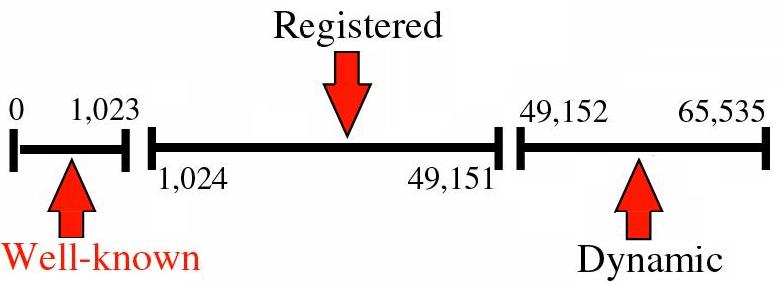
An IP address is the destination; a port is the specific service on that destination.
Key Takeaways
- TCP prioritizes reliability; UDP prioritizes speed and low overhead.
- Firewalls and NAT can block ports and break apps even when your internet is “working.”
- Most users only need to understand ports for troubleshooting, not for scanning the internet.
IP vs Port: Address vs Door
Think of it like a building: - IP address = the building’s address - Port = the apartment/door number
A single server can run multiple services: - Web traffic (usually 80/443) - Secure shell / admin access (commonly 22) - DNS (53)
TCP vs UDP: What’s the Practical Difference?
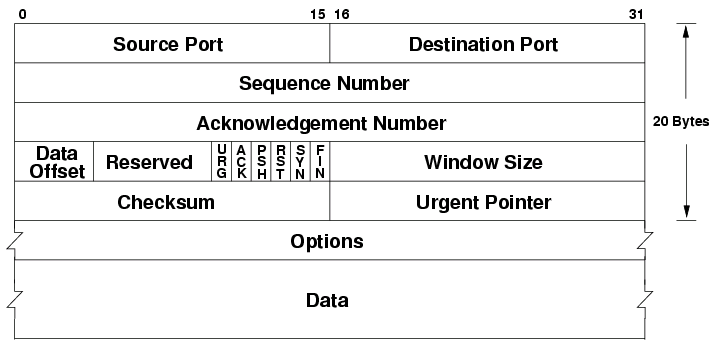
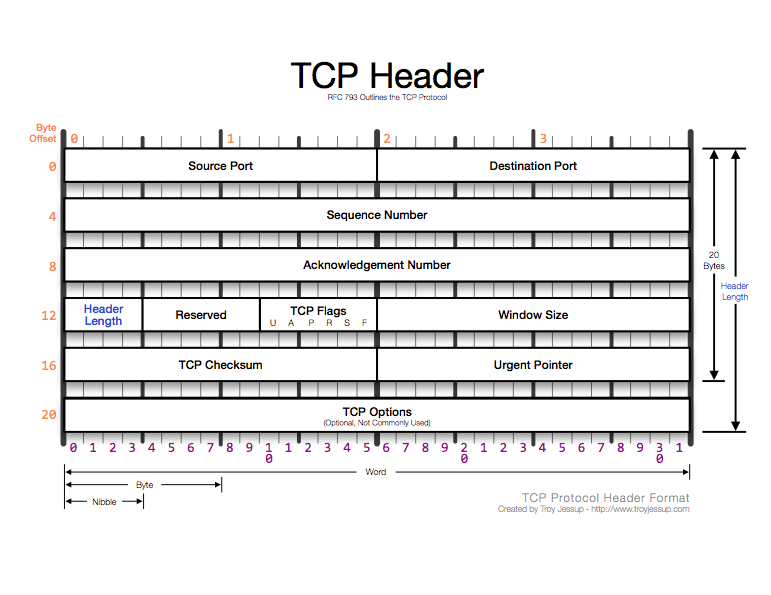
TCP (Transmission Control Protocol) TCP is built for correctness: - Establishes a connection (handshake) - Retransmits lost packets - Preserves ordering
Common examples: - Browsing websites (HTTPS) - Downloading files - Email protocols
UDP (User Datagram Protocol) UDP is built for speed: - No connection handshake - Less overhead - Delivery is “best effort”
Common examples: - Voice/video calls (often) - Online gaming (often) - Some streaming and real‑time applications
Important: many modern apps add reliability at the application layer even when using UDP.
Common Ports Users Encounter (And Why They Matter)
You don’t need a full list. The most practical ones: - 80: HTTP (often redirected to HTTPS) - 443: HTTPS - 53: DNS
If these are blocked or broken, the internet will feel “down” even though the network is connected.
NAT and Firewalls: Why Ports “Disappear”
Two common reasons you can’t reach a service:
Firewall filtering - Your router/OS/enterprise firewall may block inbound or outbound ports.
NAT / CGNAT - NAT hides devices behind one public IP. - Inbound connections often require port forwarding. - Under CGNAT, port forwarding may not work at all without ISP support.
Troubleshooting Patterns Users Actually See
“Works on mobile data but not on Wi‑Fi” Possible causes: - Wi‑Fi router firewall rules - DNS issues on the Wi‑Fi network - ISP-level filtering on that home connection
“A game works, but voice chat doesn’t” Possible causes: - UDP behavior differs from TCP - NAT traversal issues - Specific ports or protocols blocked
“I can browse, but my device can’t connect to a server I host” Possible causes: - No port forwarding - CGNAT - Wrong public IP
Safe Guidance: Don’t Scan Random Targets
It’s normal to test connectivity to services you control, but indiscriminate scanning of random IPs can violate policies or laws. For a user-facing help center, focus on: - Understanding concepts - Debugging your own networks and services
Practical Implications in Real Systems
When you know the destination IP of a service (server/game endpoint), IPVerdict can help you identify: - Which network owns it (organization/ISP) - ASN context (useful when comparing different endpoints) - Whether it looks like typical hosting infrastructure
This helps answer: - “Is this endpoint likely a cloud provider?” - “Did the endpoint network change after an update?”
Common Misunderstandings
Q1: Is TCP always better than UDP? No. TCP is reliable; UDP can be better for real-time traffic.
Q2: Why does a firewall block some ports? To reduce attack surface and stop unwanted traffic.
Q3: Do I need to open ports for normal browsing? Usually no. Most outbound browsing works without special configuration.
Q4: Does a VPN change which ports are available? It can. VPNs can bypass some network restrictions or introduce new ones.
Q5: Can ports explain captchas or bans? Not directly—those are typically related to IP reputation and behavior.
Limitations
- Knowing a port doesn’t guarantee you can connect; routing, firewalls, and service availability matter too.
- Some services use dynamic ports or multi-protocol systems.
Disclaimer
The information in this guide is provided for educational and diagnostic use. Network behavior can vary by environment, configuration, and data sources, so results should be treated as informative signals rather than definitive proof.
Conclusion
Understanding these fundamentals helps you interpret network signals more confidently and troubleshoot issues with fewer false assumptions.